
Invite a few people to try your club first, then everyone without an account, each in one confirmed send.
Why use it
Try LongTable with a handful of regulars before the whole club hears from you.
Invite everyone at once when you're ready, and see exactly who gets an email first.
A retry never emails anyone twice.
Decide who to invite
Go to Community › Members, select the Invites tab, then Invite members.
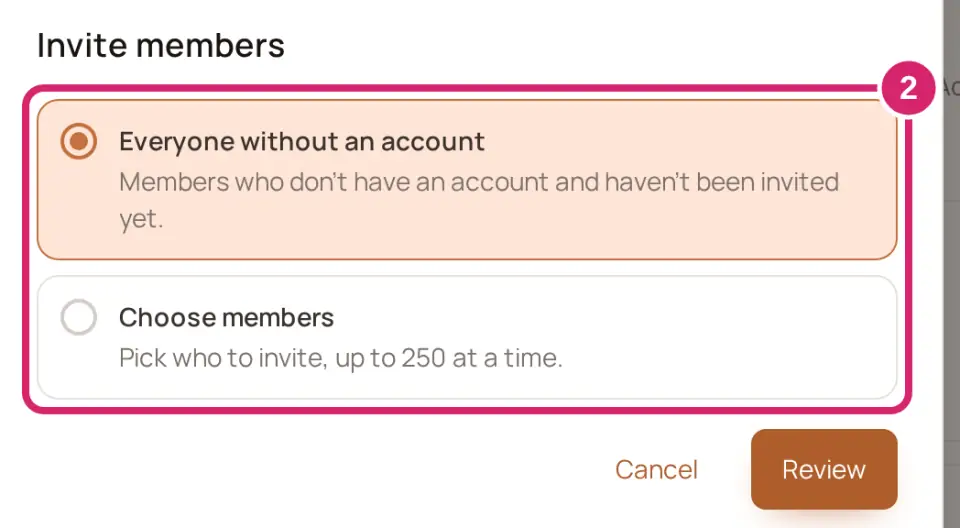
Choose who gets an invitation:
Everyone without an account: “Members who don’t have an account and haven’t been invited yet.” Choose it when you’re ready for the whole club.
Choose members: “Pick who to invite, up to 250 at a time.” Choose it to try the club with a few regulars first.
Select Review.
Check Invited and Skipped. Each skipped person shows why, such as Already has an account, No email address or A household looks after this member.
Add A note from you if you like, then select Send N invitations.
Not sure? Start with Choose members and a few regulars, then come back for everyone. One send invites up to 250 members; if more are waiting, the review says how many, and you open Invite members again for the rest.
You can close the window while it sends: the invitations keep going out. Open Invite members again on the same device and it shows the same send, with its progress and then its totals. Select Done when you have finished with it, and it opens fresh next time.
Ask the assistant
Ask the LongTable assistant, for example “Invite Jo, Marcus and Ellen to try the club” or “Invite everyone.” It shows a card called Invite members that says who gets an invitation, and nothing is sent until you confirm. It never schedules a send for later. If the assistant button isn’t there, an admin may have turned the assistant off. They can turn it back on under Configuration › Club, in Features: turn on Assistant.
If something goes wrong
Invited X. Skipped Y. Couldn’t send Z. Some invitations didn’t go out, and each name under Couldn’t send says why. Select Try again for N to send the ones that can go now. It leaves out anyone whose address needs fixing first.
This address has had too many invitations today. Try again tomorrow That address has had enough invitations for one day. Try again tomorrow.
The email address was refused. Check it on their member record, then invite them again The address is wrong or can’t receive email. Correct it on their member record, then invite them again.
The email didn’t go out, and the invitation is still waiting. Check the address, then resend it under Pending On the Invites tab, find them under Pending and resend it from there.
Who can be invited has changed since the review. Review the invitation again.
Free holds up to 25 people and a members-only site. People invited who haven’t joined yet count too. This would take your club past 25. A paid plan holds more. Ask a club admin, the treasurer, or anyone with the Billing role to choose one. You can see this when the assistant adds someone new while a club on Free is still in setup. Ask someone who manages billing to choose a plan.