
Choose who looks after your club's LongTable bill, and know who hears about it. Admins, and members with the Billing or Treasurer role, manage the bill. Only admins can cancel the plan or close the club.
Why use it
Whoever pays for LongTable is often the treasurer, not an admin. The Treasurer role and the Billing role both let them change the plan, update the card and fix a failed payment without full admin access.
Give the role to a position, not a person. When a new treasurer is elected, change who holds the position and the bill moves with it.
Canceling the plan and closing the club stay with admins. Members with the Billing or Treasurer role can’t do either.
Give the Billing or Treasurer role to someone who reads their email. Receipts and payment problems go to the club’s billing contact, which we keep set to the email of someone with one of those roles.
Decide who can manage the bill
Who should look after the bill? Each role answers it differently. A person can hold more than one role, and can do everything their roles allow.
Admin: can do everything with the bill, and is the only role that can close the club. Choose it for the people who run the club, such as the chair.
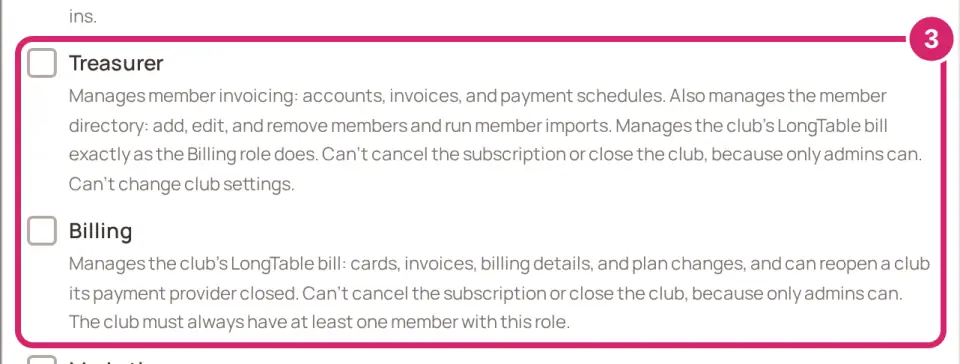
Treasurer: manages your club’s member invoicing and the member directory, and manages the LongTable bill as the Billing role does. Can’t cancel the plan or close the club. Choose it for the officer who looks after the club’s money.
Billing: manages the bill: cards, invoices, billing details and plan changes. It can bring back a club that closed because its plan was canceled. Can’t cancel the plan or close the club. Choose it when someone looks after the money but shouldn’t touch members or dues, such as a bookkeeper who helps the club.
Members who aren’t admins and don’t have the Billing or Treasurer role don’t see Billing in the menu. You can change who holds these roles at any time; the plan doesn’t change when you do.
What each role can do with the bill
See the Billing page and past invoices: admins, Treasurer and Billing.
Change the plan or switch from monthly to yearly: admins, Treasurer and Billing.
Update the card and billing details in payment settings: admins, Treasurer and Billing.
Fix a failed payment from the Billing page: admins, Treasurer and Billing.
Bring back a club whose plan was canceled, with Reactivate on the clubs page: admins, Treasurer and Billing.
Cancel the plan in payment settings: admins only.
Close the club, or reopen a club an admin closed: admins only.
Give your treasurer the bill
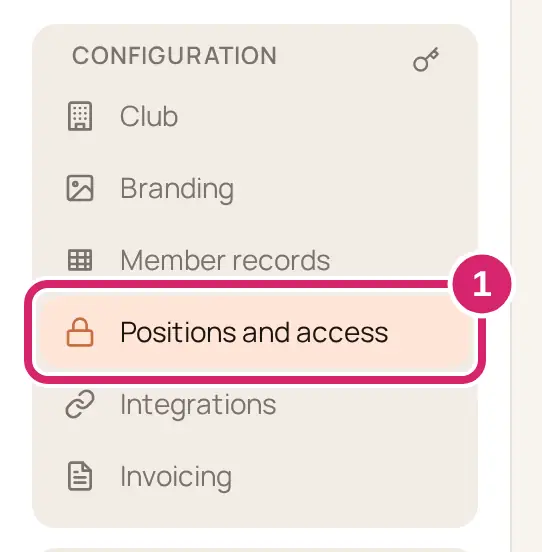
Go to Configuration › Positions and access.
Select your treasurer’s position, or select Add position to make one.
Under Roles this position grants, check Billing.
For a new position, select Add position. For a position you’re editing, select Done.
In a position you’re editing, a role you check is saved straight away, and everyone who holds the position gets it. To give one person billing access for a short time, see Give access with roles and positions.
Know who hears about the bill
There are two kinds of email about the bill. Stripe, the company that takes LongTable’s payments, sends the ones about money. LongTable sends the ones about what happens to the club.
Emails from Stripe, about money
Stripe sends these to your club’s billing contact only:
A receipt for each payment.
A receipt for each refund.
A payment that failed.
A warning that the card on file is about to expire.
The billing contact is the email of a member with the Billing or Treasurer role who signs in. Whenever someone gets or loses one of those roles, or a holder changes their email, we check it: if the billing contact still belongs to someone with the role it stays, otherwise it becomes the email of whoever has held the role longest. An address typed into payment settings lasts only until the next such change, and only if it belongs to someone with one of those roles. Admins get these emails only when their address is the billing contact. Members get none of them.
Emails from LongTable about the club
LongTable sends these to your club’s admins, to members with the Billing or Treasurer role, and to the billing contact:
A payment failed, with the date the club moves to the Free plan unless it’s fixed.
A last reminder, three days before that date.
The club moved to the Free plan.
The club closed, or opened again.
The plan changed.
An admin who closes or reopens the club isn’t emailed about their own action. These emails never show an amount or a card. Other members get none of them.
What members see when the club closes
The club disappears from members’ clubs page, and nothing there says why, so tell them before it closes. Admins still see it there, with a countdown and a way to bring it back. When a canceled plan closed it, so do members with the Billing or Treasurer role.
If something goes wrong
You don’t see Billing in the menu. You don’t have billing access. Ask an admin for the Billing role.
Ask whoever manages your club’s billing to compare plans. You don’t have billing access. Ask an admin, or a member with the Billing or Treasurer role.
Nobody got a receipt. Stripe sends receipts only to the billing contact. Check that someone with the Billing or Treasurer role signs in to LongTable and has an email address on their member record.
Every club needs someone who manages its bill, so we moved the Billing role to you. You took the Billing role from its last holder, so it’s yours now. Give it to someone else to hand it on.