
A household lets one person pay for another at every club they belong to, and lets the people in it see each other's club details. You start one from your profile by inviting someone by email, or by adding someone who doesn't sign in.
Why use it
Someone who pays a teenager's dues can get that club's invoices, and every other club's, without asking each club to change who it bills.
An organizer can fix the address or phone number of anyone in the household at their clubs, without sharing a sign-in.
Someone who doesn't sign in, such as a young member with no email address, can be in your household too. You can answer their clubs' invitations for them, and see their club records and invoices.
The household's answer about who pays follows everyone into each new club they join, with nothing to set up there.
Invite people as a Household member unless they need to change who pays. They still see everything, and only a Household organizer can make changes.
Decide who shares your household
A household is more than a way to pay: the people in it see into each other's clubs. So before you invite anyone, ask whether these people should share one.
One household — choose it when the same people pay for each other, or keep each other's details right, at more than one club: two adults and the teenagers who sign in themselves, or two people who share a home and each belong to a club. Everyone in it sees who is in it and who pays for whom, can see each other's club details (only an organizer can change them), and sees in My invoices the invoices those clubs send for any of them, and can pay them.
No household — choose it when someone pays for another person at one club only, such as someone who covers one season of swim lessons, or when someone should keep their clubs to themselves. Ask that club's treasurer or admin to send the invoices to whoever pays instead. See Pay an invoice from your club.
You can change your mind later. Anyone can leave a household at any time, and an organizer can remove anyone. Whoever leaves stops being in the household at every club, and anyone they paid for pays for themselves until someone else is chosen.
Start a household
Select your picture at the top right.
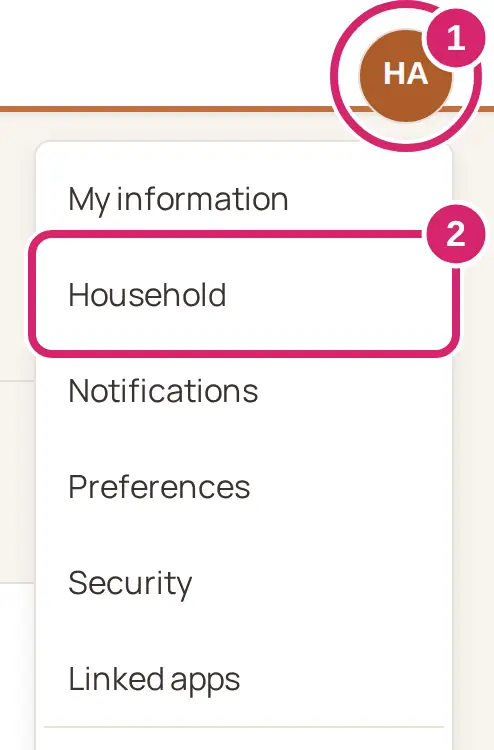
Select Household.
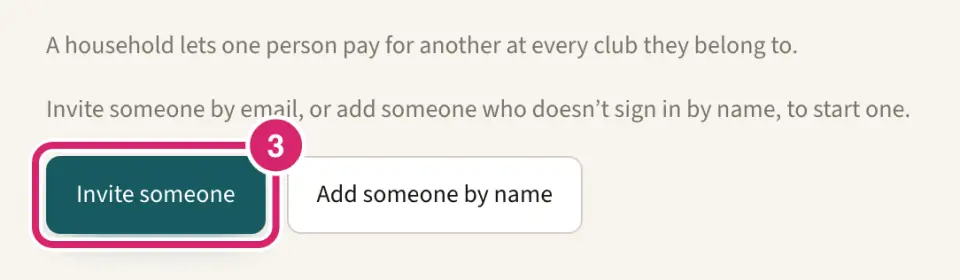
Select Invite someone.
Enter Their email address.
Under What they can do, choose how much they can change. Household member is selected for you.

Household member — choose it for a teenager, someone who only helps pay, or anyone who shouldn't move the household's bills. They see everyone in the household, who pays for whom and everyone's club records, can pay their invoices, and can leave whenever they like. They can't invite or remove anyone, or change other people's club records. They can't change who pays, not even for themselves.
Household organizer — choose it for the other adult who runs the household's clubs and bills with you. They can also invite and remove people, add someone who doesn't sign in, change who pays for everyone, change what each person can do, and change other people's club records. In a web browser, they can log in as anyone else in the household who signs in, and act for them at their club.
Not sure? Send Household member. An organizer can change it later, either way, from the ··· menu on the person's tile. Nobody can make themselves a Household member; another organizer has to.
Select Send.
Sending your first invitation, or adding someone by name, starts the household and makes you its first organizer.
To add someone who doesn't sign in instead, select Add someone by name in step 3. See Add someone who doesn't sign in, below.
They get an email, … invited you to their household, with a See this invitation button. It works for 7 days. Until they answer, they show as Waiting on your Household tab, where an organizer can Withdraw it.
When they accept, whoever invited them gets an email, … joined your household, with an Open Household button.
Someone with no LongTable sign-in creates one when they accept: the link asks for Your name and a password.
Accept an invitation
Open the invitation email and select See this invitation.
Select Accept. If you aren't signed in, select Sign in to accept with the address the invitation was sent to, or Create your account if you're new to LongTable.
If you open the invitation while you're signed in with a different account, it says so and names the address it was sent to. Select Sign in as … if that address already has an account, or Continue as … to create one with your name and a password. Stay signed in as … leaves everything as it was.
If you lose the email, open Household: under Someone invited you to their household, select the Join button that names them, or No thanks.
If you're already in a household, accepting joins the two households into one, with everyone in both. Nobody's bills move: each person keeps whoever paid for them. From then on, every organizer in the joined household can change who pays for anyone in it, and log in as them. Only a Household organizer can accept like this; a Household member must leave their household first.
Choose who gets the bills
Who should get the household's invoices? An organizer decides, and it applies at every club that bills anyone in the household.
On Household, next to Who gets the bills, select Change.
Under Pays for everyone in this household, choose who pays.
Everyone pays for themselves — how a new household starts. Choose it when each adult pays their own dues, such as housemates. Each club sends each person their own invoices.
A person's name — choose it when one person pays everyone's dues, such as whoever handles club fees at home. Every club that bills anyone in the household sends that person the invoices.
Select Done.
You can change it whenever you like. It applies to the next invoice each club sends: an invoice already sent stays with whoever got it.
When someone's bills should go to a different person from everyone else's, select that person's tile, open the ··· menu, select Change who pays for and their name, then choose someone, or They pay for themselves. Use the household setting puts them back.
A club can choose someone else to send a member's invoices to. That applies at that club only, and there it wins over your household.
My invoices, in the menu under your picture, lists invoices from every club that bills someone in your household. See Pay an invoice from your club.
Update someone's club details
On Household, select the person's tile.
If they belong to more than one club, choose one under Their clubs.
Select Edit.
Make your changes, then select Save changes.
Only a Household organizer can change someone else's club details, and only the details that club lets its own members change. A Household member sees the record with This is the club’s record. Only a household organizer can change it here. Where there's no Edit, the club lets members change nothing: ask the club. Everyone can still change their own details, from My information.
Log in as someone in your household
A Household organizer can open a club as someone else in the household sees it, and act for them there. This works in a web browser.
On Household, select the person's tile.
Open the ··· menu and select Log in as and their name.
Read what it means, then select Log in as and their name, or the club's name if they belong to more than one.
A banner stays at the top of every page while you're logged in as them. Everything you do is on their behalf, and they can see that it happened. Select Back to my account when you're done. You can't change their password or other sign-in settings.
What each person can do
Everyone in a household sees who is in it, who pays for whom and each other's club records, and can pay each other's invoices.
A Household organizer can also invite and remove people, add someone who doesn't sign in, change who pays, and change other people's club records. They change what someone can do from the ··· menu on their tile. An organizer can't make themselves a member; another organizer can.
A Household member sees a note at the top of the tab instead of these controls.
Someone who doesn't sign in has no membership type, can't pay for anyone, and can't be logged in as.
Anyone can leave. Select your own tile, select Leave this household, then confirm. To come back, you must be invited again and accept.
A household always keeps an organizer: if the last one leaves, someone else who signs in becomes one. When only one person is left, or nobody left signs in, the household ends.
Add someone who doesn't sign in
A household can hold people who don't sign in, such as a young member with no email address. An organizer adds them, and so can someone in no household yet, who then becomes its organizer.
On Household, select Add someone by name.
Enter Their name, then select Add.
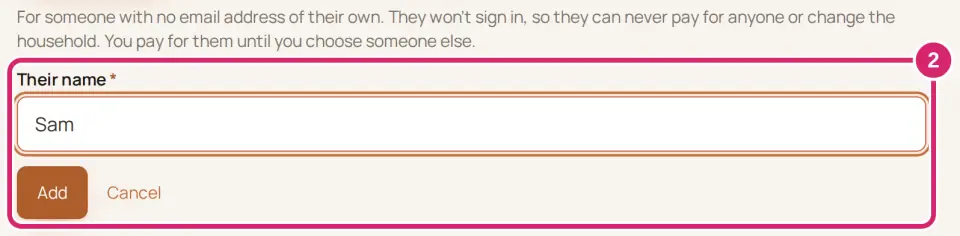
They never sign in, so they can't pay for anyone or change the household. Whoever adds them pays for them, until an organizer chooses someone else from the ··· menu on their tile. To bring them into a club, ask the club to invite them using an organizer's email, marked as someone who looks after them. When a club's invitation for them reaches you, answer Who is …? with Someone in my household and pick them. An organizer can also add them right there. That club's record then shows on their tile, and its invoices for them appear in My invoices.
Until then, their tile says Not in any club yet and explains the same steps. A Household member is told to ask an organizer.
A club can choose to send one of its members’ invoices to you, even if you aren’t a member there. It doesn’t need your agreement. You get an email saying whom you now pay for, and that club sends you their invoices from then on. Their open invoices there that nobody has started to pay are sent again to you, and whoever got them before is told they no longer need to pay them. It applies at that club only, and changes no household. See Pay an invoice from your club.
If a club says you pay for someone who has an email address and isn't in a household, your Household tab shows A club says you pay for someone. Select the button that invites them to your household, or No thanks. Nothing changes unless they accept, and the club keeps sending you their invoices either way.
What your club sees
Clubs aren't told who is in your household. When you answer a club's invitation for someone in your household, the club sees that member as Household, and nobody signs in as them. A club that sends invoices sees who gets each member's invoices, and that the reason is their household. See Collect dues with invoices.
A club can remove the membership of someone in your household, or their tie to your household. You get no email. Their tile shows … removed …’s membership for 30 days, and that club's record and invoices for them stop showing.
If something goes wrong
A household can have up to 30 people. Someone needs to leave before you invite anyone else.
Joining would make a household of more than 30 people. Someone will need to leave one of them first. Together, the two households are too big. Someone leaves one of them, then you accept again.
That person is already in your household. Nothing to do: they're in.
A household can have 10 invitations waiting at once. Under Waiting, select Withdraw on one nobody has answered, then try again.
This link no longer works. The invitation expired or was already used. Ask whoever invited you to send it again.
Someone changed your household while you were choosing. Check the latest and try again. Another organizer made a change at the same time. Look again, then make your change.