
Give a group its own email address, so anyone can write to your board, a committee or a team at one address. LongTable passes each message on to everyone in the group at that moment.
Why use it
The address stays the same when people change. When a new treasurer joins the board, add them to the group, and nobody has to update a contact list.
People outside the club, such as a venue or a sponsor, can reach the right people without knowing who holds which job this year.
Put the group's address on your website or flyers instead of a volunteer's personal email.
Pair it with a dynamic group, such as everyone who holds a board position, and the list keeps itself up to date. Dynamic groups need the Plus plan or above.
Turn on a group's email address
Go to Community › Groups and select the group.
Open Group settings.
Under Access, turn on Inbound email.
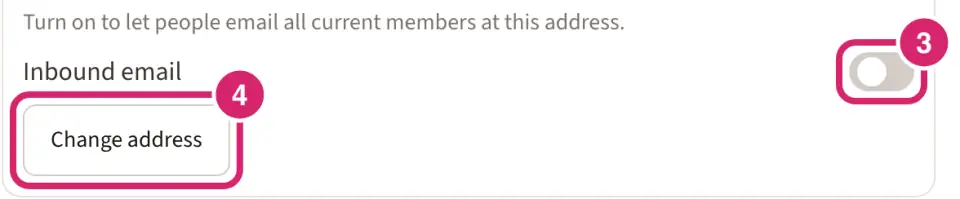
Should this group have an address that anyone can write to? That's Inbound email. It's off for a new group.
Off — choose it for groups you only write to yourself from Messaging, such as all your junior members. Nobody can email the group from outside.
On — choose it for a small group that people need to reach at one address, such as the board, the membership desk or the events team. Anyone who has the address can write to everyone in the group from their own email.
To choose the address, select Change address, type the part before the @ in Address (the part before @), and select Save.
Name the job, not the person, such as board or treasurer, so the address still fits when volunteers change. Settle on it before you share it: when you change it, the old address stops working at once, and mail sent there isn't passed on.
Share the address with the people who should use it. Members can't look it up in LongTable.
LongTable suggests an address made from the group's name. The full address ends with your club's LongTable web address.
Use lowercase letters and numbers, with single hyphens between words, such as board or trail-crew. It can be up to 64 characters.
Each group in your club needs its own address.
How messages are passed on
Anyone can write to the address, members or not. They use their own email and never sign in to LongTable.
Each current member of the group gets their own copy, sent from the group's address. Members don't see each other's email addresses.
The group's owners get copies too, even on a dynamic group whose rule doesn't match them. Once someone else owns the group, an owner can select Step down as owner. On a dynamic group, they then get its mail only while its rule matches them. On any other group, they stay a member and keep getting it.
Each copy shows who wrote it. Replying goes back to the person who wrote, not to the whole group.
The text of the message and its attachments come through. Colors, fonts and layout from the sender's email aren't kept.
A message can be up to 9 MB, attachments included.
Members with no email address, and members who unsubscribed from group email, don't get copies.
Mail that looks like spam or carries a virus isn't passed on, and neither are automatic replies such as out-of-office notices.
When people join or leave
LongTable looks up the group's members each time a message arrives. Someone you add to the group gets the next message, and someone you remove stops getting them. For a dynamic group, whoever matches its rule at that moment gets the message.
How it differs from sending a message
Send a message is for writing to groups from inside LongTable. You can send a text instead of an email, schedule it on the Plus plan and above, and find it later under Sent.
A group's address is for anyone to write in from their own email, at any time, without signing in.
Turn it off
Turn off Inbound email. Mail to the address is no longer passed on, and another group can then use the address. People who write to it aren't told, so let regular senders know first.
If your club moves to a plan without group email, mail to the address stops, and the group shows Group email forwarding with an upgrade. Select Turn off group email to close the address. Otherwise it starts working again as soon as you upgrade.
If something goes wrong
You don't see Inbound email. Only the group's owners, admins and Communications Managers see it, under Group settings. On a plan without group email, you see Group email forwarding instead.
The address won't save. Another group in your club may already use it, or it may break the rules above. Choose a different address.
A member says nothing arrived. Check that their member record has an email address, and that they haven't unsubscribed from group email in their own profile.
Someone's message never arrived. Check that it was under 9 MB with its attachments, and that it wasn't an automatic reply.