
Ask the LongTable assistant to set up dues. It explains in plain words how getting paid works, opens Invoicing and shows you each thing to do on the real page.
Why use it
Dues are usually a new Treasurer's first job, and the money part is the one people worry about.
Your club is the seller: payments go to your club's own Stripe account, which you set up on Stripe's own pages.
The assistant never sees your bank, card or identity details, and never says it set something up that you didn't.
Set up dues
Ask the assistant: “Help me set up dues.”
Read its explanation of how payments and payouts work.
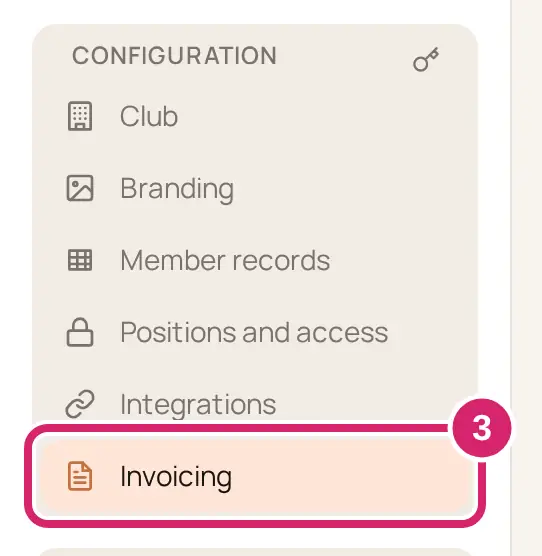
The assistant opens Invoicing, in the sidebar under Configuration, and starts a guided tour.
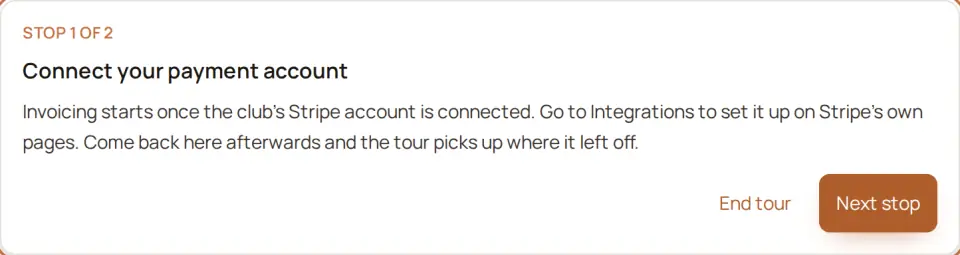
Select Go to Integrations, then the Stripe button there, such as Enable Stripe or Continue setup in Stripe. Stripe opens in a new tab; finish there.

Come back to Invoicing within 12 hours, in the same browser. The tour picks up where it left off.
Once payments are on, select New invoice schedule and fill it in, such as a name like “Dues 2026–27”. Do it for me on that stop opens an empty schedule; you fill it in and save it yourself.
If your Stripe account isn't ready yet
Tell the assistant what the Stripe card in Integrations says. It explains what that means and which button finishes it. It can't see your account itself.
Payment setup is in progress. Stripe needs more from you. Select Continue setup in Stripe.
Stripe is reviewing your details. You don’t need to do anything. You can send invoices as soon as the review is done.
Stripe has limited the club’s account, so invoices can’t be sent. Give Stripe what it asks for and sending starts again. Select Fix in Stripe.
Stripe can’t take payments for this club on this account. Review it in Stripe to see why. Stripe has turned the account down, and waiting won't change that. Select Review in Stripe, or use the Stripe Support link on the card.
If something goes wrong
Invoicing isn’t ready yet. Connect Stripe, or finish setting it up, in Integrations. Finish your account on Stripe's pages first.
We couldn’t open Stripe payment setup. Try again in a moment.
You don’t see the assistant. An admin may have turned the assistant off. They can turn it back on under Configuration › Club, in Features: turn on Assistant. Or set up dues yourself; see Collect dues with invoices.